A Hot Wheels car rolls down a ramp, races past a photogate, and crashes into a box you designed. The box skids across the table with the car inside. Where on the ramp do you release the car so the box stops in the target zone? Calibrate, find the pattern, then take your one shot.
The challenge
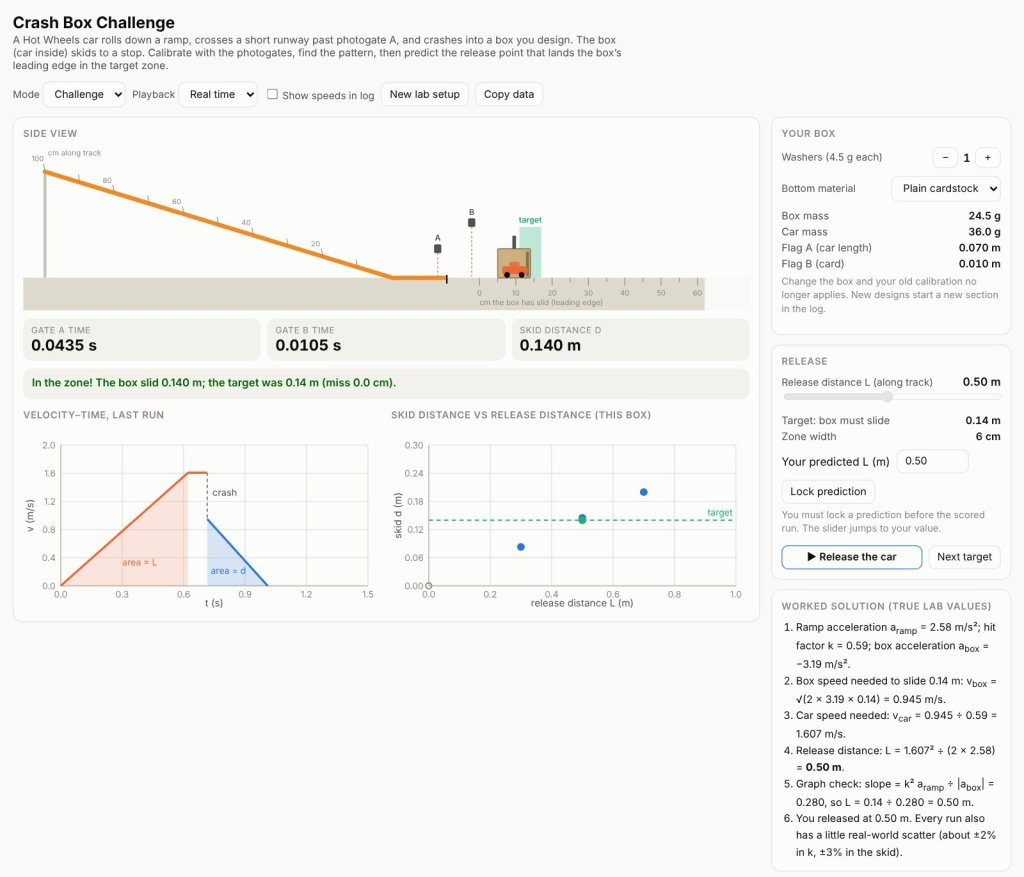
You control three things: how far up the track the car is released, how many washers ride in the box, and what the bottom of the box is made of. Photogate A times the car on the runway, using the car itself as the flag. Photogate B times a 1 cm card on the box just after the crash. A ruler gives the skid distance. From those three readings you can work out everything you need.
In challenge mode you get a target the box has to slide to, with a zone 6 cm wide. You must lock in a predicted release distance before the run, and afterward the lab shows a numbered worked solution using the true values for that setup.
Three phases and a crash
The car speeds up uniformly on the ramp, cruises across the runway, and then its speed drops all at once in the crash. After that, the box and car slow down uniformly to a stop. The crash is the part you cannot calculate yet, so you measure it: the hit factor k is the box’s speed right after the crash divided by the car’s speed right before it. For a given box, k stays the same from run to run.
Put the phases together and something surprising falls out: the skid distance is proportional to the release distance. Release from twice as far up the track and the box skids twice as far, not four times. Three calibration runs make a straight line through the origin, and its slope is all you need for the prediction. The lab plots your runs as you go so you can see the line appear.
Redesigning the box
The two design choices do different jobs. Washers change how much the box slows the car in the crash, but not how fast the box slows down once it is skidding. The bottom material does the opposite. Change the box and your old calibration no longer applies; the run log starts a new section so you can see where your data stops counting. The New lab setup button changes the ramp angle and the materials slightly, so every group has to calibrate for itself.
For teachers
This is the virtual version of a hands-on design round run with real Hot Wheels track, a cardstock box, and two photogates. It works as a pre-lab, as a make-up for absent students, or for groups that need more calibration runs than class time allows. Every calculation stays in uniform-acceleration kinematics: speeds from photogate times, accelerations from the triangles on a velocity–time graph, and a proportional model from a graph. The run log copies straight into a spreadsheet. If you teach this and would like the student packet and teacher guide, get in touch.
Inspired by the Physics Classroom’s Stopping Distance of a Hot Wheels Car animation, which treats a similar crash with work and energy. Direct link: brandoncomella-afk.github.io/physics-sims/crash-box-challenge.html

